In preparation for our video, we had the opportunity to play around with a program called Windows Movie Maker.
In this program you can use pictures, videos, music, voice recordings to create your own movie/slideshow/video. You can use transitions and effects to your liking as well as putting a title and credit.
I decided to make a video of the song 'War' by Jay Sean; it displays the song's lyrics whilst the song playing in the background.
Saturday, May 15, 2010

Tuesday, May 11, 2010
video assignment.
Today we started figuring out what we had to do for our assignment. The video had to be an instructional, like a 'how to' video.
In my group is Tania, Steph and Crishna. We had a few ideas including:
In my group is Tania, Steph and Crishna. We had a few ideas including:
- How to be lady like : We were going to use Crishna as the example and we were gonna dress her and make her act all gangsta at the start then we would change her to make her to become lady like, like wearing a fancy dress, drinking tea and talking all posh
- A cooking video : We were going to like choose a fancy recipe and make it acting like those professional chefs on tv and like wear those awesome chef hats
- Makeover tutorial : We were going to use Crishna again as the example, and like dress her all up and stuff
- How to be girly : We show the transformation of Crishna, becoming more feminine :L
At the moment we are leaning towards the cooking video as we believe it will be easy and more normal.
Wednesday, May 5, 2010
my ringtone. dizzy; day 26.
My edited 'Dizzy' Ringtone is 'here' (click the link, then it shall take you to google docs, click download, then choose open and it shall take you to my ringtone)
I created my ringtone on a prodram called 'Audacity'. I chose my current favourite song, Dizzy by Day 26 to edit for my ringtone. What i edited:
I created my ringtone on a prodram called 'Audacity'. I chose my current favourite song, Dizzy by Day 26 to edit for my ringtone. What i edited:
- I cut out most of the song leaving only my favourtie parts of the song (so that the ringtone won't be too long)
- I used 'Fade in' at the start of the ringtone and 'Fade out' at the end
- I used equalization so that the really high and low sounds are gone (which may effect the sound quality in a phone)
- I used Compressor so that the really loud sounds are gone (which may effect the sound quality in phone speakers)
When i was finished editing i exported it to an mP3.
To put my ringtone onto my blog, i had to upload it to google docs and provide the link.
Wednesday, April 21, 2010
video questions.
1. The video format we will be using this term is Digital Video, what is the other, older format that was used recently.
The older format was Analog Video.
2. Describe the difference between the two formats.
The video analog displays is transmitted to it as an analog signal, through the air or cables. Digital signals are transmitted only as precise points selected as intervals on the curve.
3. What are some advantages of digital video.
Digital video is quicker than analog because it doesn't need to take the time to pass through the channels. It is also more reliable, easy to manipulate and it is compatible with other digital systems.
4. What is meant by frame rate in video.
Frame rate in video is the number of pictures being shown per second. It usually takes a frame rate of 10 frames per second for us to perceive smooth motion. The higher the frame rate, the smoother playback.
5. Do all applications use the same frame rate, explain your answer.
Not all applications use the same frame rate. e.g. the movies in the cinema are projected at 24 frames/ sec whereas movies on television are projected at approx. 30 frames/ sec.
6. What is meant by resolution, how is it measured.
Resolution is used to descrbe the number of pixels used to display an image. Higher resolutions means that there are more pixels used, making the image look sharper
7. What is the colour system called RGB?
RGB stands for Red, Green, and Blue components of a colour. Every pixel we see is actually the product of light coming from a red, a green, and a blue phosphor placed close together.
8. Explain the video standards PAL, NTSC, and SECAM, what are the main differences between them?
PAL stands for Phase Alternating Line, NTSC stands for National Television System Committee and SECAM stands for SEquential Couleur Avec Memoire or Sequential Colour with Memory. The main difference between these video standards is that each one is incompatible with each other. America and Canada use NTSC, Western Europe and Australia use PAL and Eastern Europe and France use SECAM.
9. Which standard do we use in Australia?
In Australia we use the PAL video format
10. For what type of video camera would you need to have a Video Capture Card in your computer to download video?
To have a video capture card, you should have an analog video camera
11. Why don't we need a video capture card for the video we will be doing at school?
Because we are going to be using digital video cameras which have USB cables to connect them to computers.
12. What is an IEEE 1394 port?
IEEE 1394 port is the connection between a camera and the computer.
13. Why do digital video cameras use video compression?
All of the data must be compressed so the video can save in a suitable stroage amount. The goal of compression is to reduce the data rate while keeping the high image quality.
14. Describe what a codec is.
Codec is short for 'compression/decompression' and is used to shrink large movie files and makes them able to play on the computer.
15. What is meant by generation loss, where does it happen?
Generation loss refers to the loss in quality and potential increase in file size between copies of data. It can happen when there is a noise interference during transmission.
The older format was Analog Video.
2. Describe the difference between the two formats.
The video analog displays is transmitted to it as an analog signal, through the air or cables. Digital signals are transmitted only as precise points selected as intervals on the curve.
3. What are some advantages of digital video.
Digital video is quicker than analog because it doesn't need to take the time to pass through the channels. It is also more reliable, easy to manipulate and it is compatible with other digital systems.
4. What is meant by frame rate in video.
Frame rate in video is the number of pictures being shown per second. It usually takes a frame rate of 10 frames per second for us to perceive smooth motion. The higher the frame rate, the smoother playback.
5. Do all applications use the same frame rate, explain your answer.
Not all applications use the same frame rate. e.g. the movies in the cinema are projected at 24 frames/ sec whereas movies on television are projected at approx. 30 frames/ sec.
6. What is meant by resolution, how is it measured.
Resolution is used to descrbe the number of pixels used to display an image. Higher resolutions means that there are more pixels used, making the image look sharper
7. What is the colour system called RGB?
RGB stands for Red, Green, and Blue components of a colour. Every pixel we see is actually the product of light coming from a red, a green, and a blue phosphor placed close together.
8. Explain the video standards PAL, NTSC, and SECAM, what are the main differences between them?
PAL stands for Phase Alternating Line, NTSC stands for National Television System Committee and SECAM stands for SEquential Couleur Avec Memoire or Sequential Colour with Memory. The main difference between these video standards is that each one is incompatible with each other. America and Canada use NTSC, Western Europe and Australia use PAL and Eastern Europe and France use SECAM.
9. Which standard do we use in Australia?
In Australia we use the PAL video format
10. For what type of video camera would you need to have a Video Capture Card in your computer to download video?
To have a video capture card, you should have an analog video camera
11. Why don't we need a video capture card for the video we will be doing at school?
Because we are going to be using digital video cameras which have USB cables to connect them to computers.
12. What is an IEEE 1394 port?
IEEE 1394 port is the connection between a camera and the computer.
13. Why do digital video cameras use video compression?
All of the data must be compressed so the video can save in a suitable stroage amount. The goal of compression is to reduce the data rate while keeping the high image quality.
14. Describe what a codec is.
Codec is short for 'compression/decompression' and is used to shrink large movie files and makes them able to play on the computer.
15. What is meant by generation loss, where does it happen?
Generation loss refers to the loss in quality and potential increase in file size between copies of data. It can happen when there is a noise interference during transmission.
Tuesday, April 20, 2010
awesome camera phones.
Elements of a good camera phone:
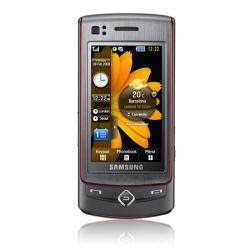
- 8 megapixels or more
- auto focus
- image stabalization
- a nice range of preset scene modes
- xenon or dual LED flash
- good quality optics
- fast internet connection
- easy to use interface
refrence: http://mobilementalism.com/how-to-buy-the-best-camera-phone/
The Samsung Tocca Ultra
Features include:
- 8 mega pixels
- great picture quality
- huge range of camera-related options
- excellent all round phone as well
- also takes fantastic video; great colours, smooth motion, 30 frames per sec & a slow motion of 120 frames per sec
Wednesday, March 31, 2010
last ist lesson for term one.
yesterday (30.03.10) we learnt how to change the layout of the blog!! it's so cool!
what you do is go to your dashboard, then on the URL change it to draft.blogger.com instead of www.blogger.com. Then you go to layout and you have a bigger range to choose from. :)
It would be so awesome if we could design our own blog skin but. Mr Lennon if you read this maybe you can teach us how next term ^^
I have just read the marking criteria again and the bit that says animation displays smooth motion. My one depends how fast the computer the viewer is on. And I sort of wanted it to be a little 'jerky'.
And the bit that says an obvious meaning. The meaning of my animation is that Clare (represented by oranges) has lots of house spirit and that were very cheerful and we are like a team and stuff.
Since this is our last IST lesson for the term, I'll like to say IST is an awesome subject and I encourage anyone to choose it for an elective.
what you do is go to your dashboard, then on the URL change it to draft.blogger.com instead of www.blogger.com. Then you go to layout and you have a bigger range to choose from. :)
It would be so awesome if we could design our own blog skin but. Mr Lennon if you read this maybe you can teach us how next term ^^
I have just read the marking criteria again and the bit that says animation displays smooth motion. My one depends how fast the computer the viewer is on. And I sort of wanted it to be a little 'jerky'.
And the bit that says an obvious meaning. The meaning of my animation is that Clare (represented by oranges) has lots of house spirit and that were very cheerful and we are like a team and stuff.
Since this is our last IST lesson for the term, I'll like to say IST is an awesome subject and I encourage anyone to choose it for an elective.
Thursday, March 25, 2010
orange animation.

Orange Animation (<--) Mr Lennon this link is my final animation.
if thats not working, just mark the movie maker one (below)
I couldn't upload my actual GIF animation as it wasn't uploading properly but atleast I got the URL. It's odd that GIF images from the internet works on the blog but my GIF images won't, so confused. Some of my friends had the same problem, apparantly to do it you have to save/upload your blog to a website like 'image shack' or something and then put it on your blog.
animation backup.
I did another of my animation on Windows Movie Maker because it wasn't uploading properly. Windows Movie Maker was very easy to use and it is good for getting the timing of your frames right. You can even add music to it, but I wasn't bothered :P The only downside is when I published the movie the colour of the orange went all yucky, like its like so dark and dull when it supposed to be bright and cute! --"
Tuesday, March 9, 2010
animation journal.
09.03.10
For our IST assignment, we are creating an animation supporting our house colour (mine is Clare -Orange)
I have decided to make my animation on 'Inkscape' as I am used to using the program and being modest, I would say I'm fairly good at it :) It is a free drawing program which you can easily download it from the internet at home as I have already done.
I enjoy using Inkscape as it is easy to use since there are many tools to choose from. My favourite tool combination is using the one that allows you to 'Draw Bezier curves and straight lines', I use this tool to make polygons and then using the tool 'Edit paths by nodes' which allows you to fix/edit your shape by moving the corners around and also if you click on one of the corners and then clicking the 'make selected nodes smooth' it turns the curner into a curved corner. Then I love playing with 'Fill and Stroke' to play around with the colours and outline widths. And using the grid (shift and #) should make it easier to ensure the animation stays in line.
I would say I'm pretty experienced in Inkscape and using it I have become a big fan and I use it for my other assignments. Like in Commerce I designed a logo for a project using Inkscape: (copyright LOL)

 This lesson we learnt how to change the size and colour of the canvas and how to export images (in Inkscape).
10.03.10
Inkscape Notes:
- Set background colour of CANVAS
- Size canvas (around abouts 400x400px)
- SAVE DRAWING FILE (.svg)
- When exporting from inkscape select "PAGE"
- create and use ONE folder for your files .
I spent this lesson planning my animation and I have decided for my animation to make dancing oranges :) on Inkscape which spell out the name of my house (Clare). My idea is for 6 oranges to roll into the centre of the page and they will take turns putting up a sign that will spell out 'CLARE!'. After that they will roll back off the screen and a orange flash that says 'GO CLARE!' will pop up for a bit and then the animation will restart..
12.03.10
This lesson I have designed what my characters will look like...As you can see they all look the same, it is a very basic drawing to do, however I believe the simplicity makes them look even cuter :D I just made an orange circle and thickened the black outline a bit. Then I made a smaller black circle (for the eye) and copied and pasted it for the other eye. For the mouth and the leaf, I used the tools 'Draw Bezier curves and straight lines' and 'make selected nodes smooth'. (see my explanation on my first entry). Next I used the select tool to draw a box around my orange and then I grouped it (Control and G) to make it one image. After I grouped it, I copy and pasted it to make the other oranges, and I just flipped 3 of them.
 btw copyright :)
16. 03.10
My orange animation is going okay but my original plan of them rolling to the centre and back isn't working out. It is fairly simple to make them roll as all you have to do is rotate them, however the timing/positioning gets confusing, I mean like I want to roll them to the centre but when they reach the centre they are like upside down or sideways when I want them to be upright. Since it was taking so long to get the timing/positioning right, I gave up and instead I have decided to just make them shuffle along to the centre. They are just tilting themselves side to side towards the centre, it is a lot simpler to do so I am happy with my desicion.
Another problem I had was fitting them all on the screen. I thought this problem would occur so I made the canvas a little longer than average(400 by 500px) when I first started. However, it ended up being still a little too small but I managed to squish them in (they're just slightly overlapping) but it looks okay to me.
17.03.10
I believe I have finished all my frames but the thing is there is only like around 27 frames so I'm afraid its like too short. But yeh it was annoying making them because the inkscape kept saying a problem has occured so it kept closing itself without saving so I had to keep on starting again.
I am also confused about how to put all the frames into one animation. I am thinking of using windows movie maker to make it into an animation cause I have done that before but I'm wondering if there is some special way to put it into an animation. I'll ask Mr Lennon next lesson.
19.03.10
I have been told that I had too little frames so I spent majority of this lesson adding more frames to my animation. I have about 58 frames now, but I was told we'll need about 70. Mr Lennon gave me advice to duplicate some of the frames to make it stay on longer. I asked Mr Lennon about how we are going to put it into one animation and he said that we will use Gimp to make it.
My homework is to make more frames.
23.03.10
This lesson I finished making my frames. It was a little hard as I didn't know what else I could add so I decided to double up all my frames and add a sequence where the oranges a jumping. Next lesson I'll be making it into an animation :D
24.03.10
I have made my animation XD i'm so happy! I think I'm like one of the first. I made it on Gimp. To me Gimp is a little confusing as it opens up as 3 windows instead of 1. What I had to do was import all my frames into Gimp (and it made it like layers), then I went on save as and saved it as a 'gif'.After it will give you an option to either flatten it or save as an animation, obviously choose save as animation. It will then give you an option to loop forever, meaning have the animation run continuously. Then click save and then the animation is done.
When I first made the animation, it was a little fast so I made it again and slowed the pace a little.
All I have to do is upload it to my blog.
25.03.10
PROBLEM!!! I tried uploading my animation to my blog but it's not working !!! ><
And I don't have any lessons before its due to ask Mr Lennon because its like due tomorrow =="
I have come up with a back up plan! I have re-done my animation on Windows Movie Maker but yeh I'm not happy with the outcome, it's very pixelly and the colour went so bad. My hypothesis is windows movie maker pulishes with only a few bits and therefore the colour didn't turn out 100% and why you can see the pixels. I guess my finished animation turned out okayy but i wish I could put the one GIf one on, but I can't upload it :(
Tuesday, March 2, 2010
eight of clubs activity.
Monochrome Bitmap 24-Bit Bitmap
 It sort of looks the same but I guess the 24 bitmap is slightly smoother and clearer but very very slightly.
 24-Bit Bitmap

Subscribe to:
Posts (Atom)