Friday, December 3, 2010

Wednesday, December 1, 2010
evaluation.
+ i like how my game flows easily to each level
- i think my game is a little short (only 3 levels)
+ i like how my game is unique
- my game is pretty easy to win, well if you have a steady hand and are patient
+ i created all the sprites myself
- i didn't incorporate a variable, my bad.
+ i incorporated sound into it
- the ball sort of lags a bit, but when it reaches the mouse pointer, it starts "spazzing" (seems to be okay, when on full screen)
- i think my game is a little short (only 3 levels)
+ i like how my game is unique
- my game is pretty easy to win, well if you have a steady hand and are patient
+ i created all the sprites myself
- i didn't incorporate a variable, my bad.
+ i incorporated sound into it
- the ball sort of lags a bit, but when it reaches the mouse pointer, it starts "spazzing" (seems to be okay, when on full screen)
Tuesday, November 30, 2010
problems i've encountered.
- well right now [2:55 30/11], my Scratch thing is not responding ( D': ) and all the stuff i've done today, which is a lot, hasn't been saved ( D': D': ) and theres a good chance all the work i've done will get deleted. ( D': D': D': )
- when i first started creating my game, i was confused on how to make levels and put it all together, so i made different levels in different scratch windows. i then found out that i could make levels through "broadcast" partnered with "when i receive," with these i could make level 1 sprites disappear and level 2 sprites appear.
- with my game i realised that if the ending of the level doesn't match up with the beginning of the next level, the game is impossible. so i had to alter my mazes so that they would allign with each other.
- before on my title screen the "play" (which you click) was in the centre, and that lvl 1 began in the bottom left corner. so people kept losing. i then changed this so the "play is also in the bottom left corner, but now the titlescreen looks sort of odd.
- i also found the ball too slow and it takes a while for it to follow the mouse pointer, so i increased the speed
- also i have a problem with the ball, where it seems to shake crazily when reaching the mouse pointer, i am yet to find a solution.
my game progress.
so i've been working on my actual game for around 2 weeks now, and i'm just about finished; all i have to do is add sound effects.
i decided to do a scary maze as i thought it would be unique, and quite easy to do. The aim of the game is to get the ball to the red rectangle at the end of each maze without touching the walls, if the walls are touched, the game starts again. this can prove to be quite frustrating, so i purposely made the game easier. i've made 3 levels for my game, each level increasing in difficulty, as there is a shortage of time and i didn't want to over complicate things. at the completion of all 3 levels, something pops up unexpectedly (well, not if you read this prior to playing the game) thus giving the player a "scare."
i created all the sprites myself using the "paint new sprite option" and it was quite easy. to make this game successful, i manipulated Scratch's multiple tools. The main component to make the game fall perfectly into place is "Broadcast" partnered "when i recieve." After discovering these, i finally understood how to make the game actually a game.
i decided to do a scary maze as i thought it would be unique, and quite easy to do. The aim of the game is to get the ball to the red rectangle at the end of each maze without touching the walls, if the walls are touched, the game starts again. this can prove to be quite frustrating, so i purposely made the game easier. i've made 3 levels for my game, each level increasing in difficulty, as there is a shortage of time and i didn't want to over complicate things. at the completion of all 3 levels, something pops up unexpectedly (well, not if you read this prior to playing the game) thus giving the player a "scare."
i created all the sprites myself using the "paint new sprite option" and it was quite easy. to make this game successful, i manipulated Scratch's multiple tools. The main component to make the game fall perfectly into place is "Broadcast" partnered "when i recieve." After discovering these, i finally understood how to make the game actually a game.
Tuesday, November 16, 2010
say something.
in this tutorial, it teaches how to make your sprite talk.
in this script, the sprite begins talking after it is clicked;

glide.
in this tutorial, it teaches how to make the sprite glide to a particular spot.
here is an example of a script;

follow the mouse.
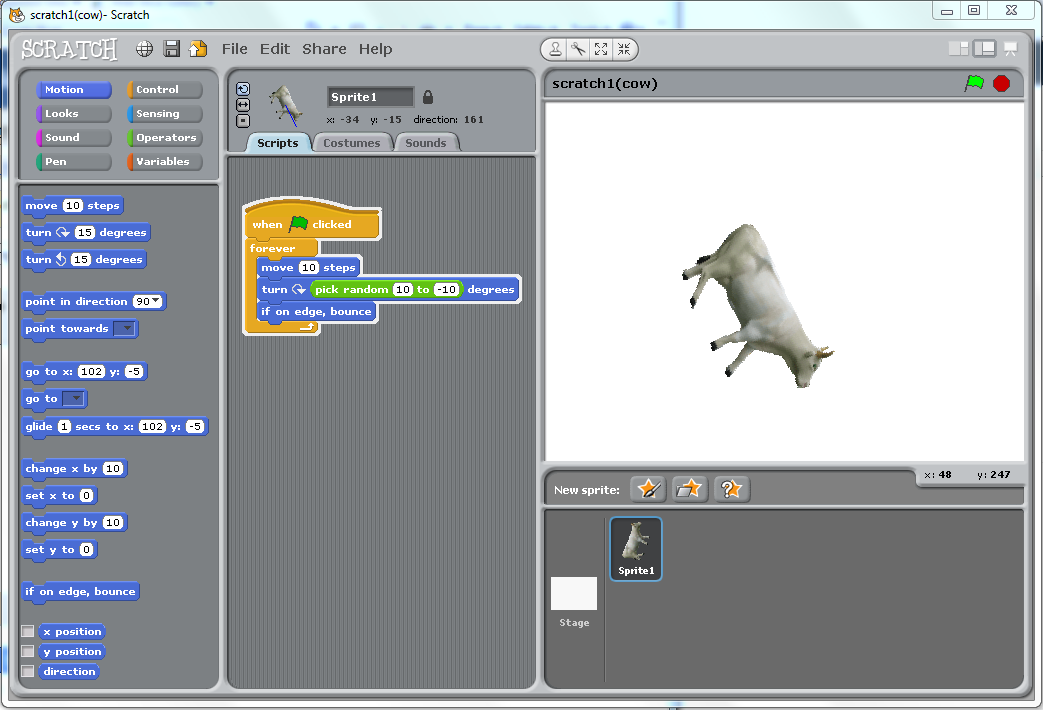
in this tutorial, it teaches how to make the sprite follow the mouse.
here is a copy of the script;

Tuesday, November 9, 2010
key moves & keep score.
i created a practice game where there are these round things coming at the dragon and the player uses the arrow keys to move and space to make the dragon breathe fire. when the round things touch the fire, they dissapear and the score increases by one.
here are the scripts.

here is a screenshot of the game.

Tuesday, October 26, 2010
scratch challenge 3 and 4.
in challenge 3 we had to make the bat switch from costume to costume to give an illusion of flying, and in challenge 4 we had to make the bat appear as if it was flying towards you by changing the size.


scratch challenge 2.
i have designed an animation where there are fish swimming around and when they come n contact with the shark, the shark closes its mouth giving the illusion of it chomping them, and they disappear for a few seconds, giving an illusion of them being eaten.
here is the script for the shark;
here is the script for the shark;

here is the script of one of the fish;

here is a screenshot of the animation;

Wednesday, October 20, 2010
Tuesday, October 19, 2010
flowchart questions.
1. For each of the flowcharts below describe in words what you think they will do.

In this flowchart, it shows the process of printing temperature. It begins by reading the temperature, it then deciphers whether the temperature is below 32, if yes, it prints "below freezing", if not, it prints "above freezing".

This flowchart demonstrates the one second response to a switch. When the switch is on, LED will be turned on, after one second, LED is turned off and the timer is reseted.
2. Convert one of the algorithms you have created in the previous task into a flowchart.
click here. (btw, i made it wrong)
In this flowchart, it shows the process of printing temperature. It begins by reading the temperature, it then deciphers whether the temperature is below 32, if yes, it prints "below freezing", if not, it prints "above freezing".
This flowchart demonstrates the one second response to a switch. When the switch is on, LED will be turned on, after one second, LED is turned off and the timer is reseted.
2. Convert one of the algorithms you have created in the previous task into a flowchart.
click here. (btw, i made it wrong)
Tuesday, October 12, 2010
algorithm questions.
definitions.
algorithm; a precise rule (or set of rules) specifying how to solve some problem
pseudocode; a compact and informal high-level description of a computer programming algorithm that uses the structural conventions of a programming language, but is intended for human reading rather than machine reading
machine language;a system of instructions and data executed directly by a computer's central processing unit
high level computer language; programming language with strong abstraction from the details of the computer
flowchart;a diagram of the sequence of operations in a computer program or an accounting system
sequence; serial arrangement in which things follow in logical order or a recurrent pattern
selection;the act of choosing or selecting
repetition;an event that repeats
traffic lights;
approach lights.
check colour of light.
if the light is green then continue.
if the light is red then stop.
if the light is orange then slow down.
entering room;
approach door.
reach for door knob with hand.
twist door knob open.
push/ pull door open.
enter room.
algorithm; a precise rule (or set of rules) specifying how to solve some problem
pseudocode; a compact and informal high-level description of a computer programming algorithm that uses the structural conventions of a programming language, but is intended for human reading rather than machine reading
machine language;a system of instructions and data executed directly by a computer's central processing unit
high level computer language; programming language with strong abstraction from the details of the computer
flowchart;a diagram of the sequence of operations in a computer program or an accounting system
sequence; serial arrangement in which things follow in logical order or a recurrent pattern
selection;the act of choosing or selecting
repetition;an event that repeats
traffic lights;
approach lights.
check colour of light.
if the light is green then continue.
if the light is red then stop.
if the light is orange then slow down.
entering room;
approach door.
reach for door knob with hand.
twist door knob open.
push/ pull door open.
enter room.
Wednesday, September 15, 2010
broadband research.
1. What is broadband?
a network that can transmit a wide range of signals, including audio and video.
2. Outline the methods of delivery of broadband (wireless, cable, ADSL and fibre)? Identify the speed of each method.
wireless; Uses Radio Frequency Signals
cable; increasingly powerful network that allows much faster and more efficient broadband to be delivered and often for a very competitive price -Fibre Optic Cable
ADSL; (Asymmetric Digital Subscriber Line) - Telephone line
fibre; high speed Internet access - Fibre Optic cable to deliver data
3. Discuss the advantages and disadvantages of each method.
wireless; + wire free, therefore easy installation -
cable; + powerful, efficient - complication of wires
ADSL; + -
fibre; + high speed Internet access - complication of wires
4. Give examples of broadband providers and identify the costs.
Optus; around $40 to $130 per month, depending on plan
Telstra Bigpond; around $20 to $120 per month, depending on plan
TPG; around $30 to $100 per month, depending on plan
5. The Federal Government is thinking of rolling out a national broadband network (The NBN). Research the NBN and find out:
a. what method of delivery it will use; laying of fibre optic cabling
b. the expected speed; capable of delivering speeds of 100 megabits per second
c. the expected costs; pretty affordable
6. Do you think Australians should invest in The NBN? Justify your answer. I think Australians who are regularly using internet for business, communiction and whatnot should invest in NBN because it is fast and affordable. This means no more wasted time waiting for sites to load, no more laggy videos, just super fast and efficent broadband :)
a network that can transmit a wide range of signals, including audio and video.
2. Outline the methods of delivery of broadband (wireless, cable, ADSL and fibre)? Identify the speed of each method.
wireless; Uses Radio Frequency Signals
cable; increasingly powerful network that allows much faster and more efficient broadband to be delivered and often for a very competitive price -Fibre Optic Cable
ADSL; (Asymmetric Digital Subscriber Line) - Telephone line
fibre; high speed Internet access - Fibre Optic cable to deliver data
3. Discuss the advantages and disadvantages of each method.
wireless; + wire free, therefore easy installation -
cable; + powerful, efficient - complication of wires
ADSL; + -
fibre; + high speed Internet access - complication of wires
4. Give examples of broadband providers and identify the costs.
Optus; around $40 to $130 per month, depending on plan
Telstra Bigpond; around $20 to $120 per month, depending on plan
TPG; around $30 to $100 per month, depending on plan
5. The Federal Government is thinking of rolling out a national broadband network (The NBN). Research the NBN and find out:
a. what method of delivery it will use; laying of fibre optic cabling
b. the expected speed; capable of delivering speeds of 100 megabits per second
c. the expected costs; pretty affordable
6. Do you think Australians should invest in The NBN? Justify your answer. I think Australians who are regularly using internet for business, communiction and whatnot should invest in NBN because it is fast and affordable. This means no more wasted time waiting for sites to load, no more laggy videos, just super fast and efficent broadband :)
Tuesday, September 14, 2010
multimedia assignment 4.
With myself finishing the final touches to my websites, my group and I have officially finished!!! ^_________________^ and at 8pm too! and i thought i would be doing an all-nighter tonight for that perfect last-miute finish ;) but no, we actually finished early ^^
you can visit our homepage by clicking "here" !!
the topics i did were ; netbooks, wifi, motherboards and piracy and copyright
group/ self evaluation ;
+ i reckon our group did heaps well as we're finished on time, we got all our info done and we had great communication :)
- since we we're working on seperate wix's, there are some slight and some obvious differences between our wix's which i guess is bad since its not 100% cohesive, because some have lots of info, and some have good info etc.
+ i seriously put a lot of effort (towards the last few days) into my work and i believe i answered the questions as good as possible :)
+ i think my wix is totally beautiful, i really tried to experiment with the different gadgets (like scrollbar textboxes, image sliders, etc)
- i suppose my work is a little last minute, and i only started putting real effort in towards the last week, which was pretty slack to my group who has been working hard continuously
wix evaluation ;
- wix turned out to be a really large flash website; meaning it is really slow, especially with computers that are already slow so it ended up being really really really REALLY slow; this made it really time consuming and frustrating to use at some times
+ although wix was annoying-ly slow, i still enjoyed using it since it was aesthetically pleasing, there were are bunch of gadgets that made it super cool and exciting and overall it was pretty awesome :)
you can visit our homepage by clicking "here" !!
the topics i did were ; netbooks, wifi, motherboards and piracy and copyright
group/ self evaluation ;
+ i reckon our group did heaps well as we're finished on time, we got all our info done and we had great communication :)
- since we we're working on seperate wix's, there are some slight and some obvious differences between our wix's which i guess is bad since its not 100% cohesive, because some have lots of info, and some have good info etc.
+ i seriously put a lot of effort (towards the last few days) into my work and i believe i answered the questions as good as possible :)
+ i think my wix is totally beautiful, i really tried to experiment with the different gadgets (like scrollbar textboxes, image sliders, etc)
- i suppose my work is a little last minute, and i only started putting real effort in towards the last week, which was pretty slack to my group who has been working hard continuously
wix evaluation ;
- wix turned out to be a really large flash website; meaning it is really slow, especially with computers that are already slow so it ended up being really really really REALLY slow; this made it really time consuming and frustrating to use at some times
+ although wix was annoying-ly slow, i still enjoyed using it since it was aesthetically pleasing, there were are bunch of gadgets that made it super cool and exciting and overall it was pretty awesome :)
multimedia assignment 3.
GUESS WHAT ? We got an extenision !!! :D :D :D just what I needed !
Our due date was pushed anoher 4 days (i think) which was totally amazing :) This gave me time to relax a little and take more time to put effort into my websites. At the moment, my internet at home is still slow ==" so for the past few days i've been going to the library at lunch to do it, and spending some all-nighters at my cousin's house to use their computer.
Here are a few more problems we/ I had to face:
- it wouldn't work when i tried to add videos onto wix by using the embed code, but i after i asked miss, she told me to try finding the video straight from the wix (if that makes sense) and it worked ! ^^
- (since we're doing the whole make-seperate-websites-then-link-it-to-a-homepage sort of thing) we tried doing this (by linking the (cute) little house icon) and it worked but we realised when you click the link it opens in a new window (which would be bad since if you were looking at all the topics you would end up with like a "gazillion" windows)so we had to go back to each link and select the "open in same window" option ~problem solved ! :D
Our due date was pushed anoher 4 days (i think) which was totally amazing :) This gave me time to relax a little and take more time to put effort into my websites. At the moment, my internet at home is still slow ==" so for the past few days i've been going to the library at lunch to do it, and spending some all-nighters at my cousin's house to use their computer.
Here are a few more problems we/ I had to face:
- it wouldn't work when i tried to add videos onto wix by using the embed code, but i after i asked miss, she told me to try finding the video straight from the wix (if that makes sense) and it worked ! ^^
- (since we're doing the whole make-seperate-websites-then-link-it-to-a-homepage sort of thing) we tried doing this (by linking the (cute) little house icon) and it worked but we realised when you click the link it opens in a new window (which would be bad since if you were looking at all the topics you would end up with like a "gazillion" windows)so we had to go back to each link and select the "open in same window" option ~problem solved ! :D
Thursday, September 9, 2010
problems that we've/ i've encountered.
- Since wix.com doesn't have any collaboration options, we had to come up with a strategy (where we got all our info first and then make our seperate wix's and link it to one home page)
- Later there was a bit of confusion about our strategy which we worked out through "communicating". We then made a minor alteration to our strategy and decided to make a seperate wix for each topic (with each tab on the wix being a different question (which i think is very genius)) and then link each wix to the one home page
- My internet congestion speed at home is really really really slow at the moment (which is excruciatingly annoying) so wix.com can't even half load so with 2 days left to go i would have to work on it during lunchtimes at school and travel to my cousin's place to use their computer and hopefully finish (or else i'll be letting my group down and feel insanely guilty if we fail)
- Later there was a bit of confusion about our strategy which we worked out through "communicating". We then made a minor alteration to our strategy and decided to make a seperate wix for each topic (with each tab on the wix being a different question (which i think is very genius)) and then link each wix to the one home page
- My internet congestion speed at home is really really really slow at the moment (which is excruciatingly annoying) so wix.com can't even half load so with 2 days left to go i would have to work on it during lunchtimes at school and travel to my cousin's place to use their computer and hopefully finish (or else i'll be letting my group down and feel insanely guilty if we fail)
Friday, August 27, 2010
bibliography.
NETBOOKS
- Wisegeek, viewed 17/08/10, http://www.wisegeek.com/what-is-a-netbook.htm.
- Cnet News, viewed 17/08/10, http://news.cnet.com/what-is-a-netbook-computer/.
- PC Authority, viewed 18/08/10, http://www.pcauthority.com.au/News/175753,whats-next-for-the-future-of-the-netbook.aspx.
- 64 Bit Computers, viewed 18/08/10, http://64-bit-computers.com/wp-content/ECS_945GCT-M.jpg.
PIRACY AND COPYRIGHT
- Slideshare, viewed 24/08/10, http://www.slideshare.net/msjasmin/copyright-and-piracy.
- The Gemini Geek, viewed 28/08/10, http://www.thegeminigeek.com/what-is-piracy/..
- Microsoft, viewed 28/08/10, http://www.microsoft.com/australia/genuine/Piracy.mspx.
- Astra, viewed 28/08/10, http://astra.org.au/pages/copyright-piracy.
- Copyright, viewed 28/08/10 http://www.copyright.org.au/information/cit020/wp0019.
MOTHERBOARDS
- E-articles, viewed 29/08/10, http://e-articles.info/e/a/title/Types-Of-Motherboards/.
- Ehow, viewed 29/08/10, http://www.ehow.com/how-does_4928345_how-motherboards-work.html .
- Overlock3d, viewed 29/08/10, http://www.overclock3d.net/news/cpu_mainboard/upcoming_asus_amd_motherboard_with_sata6_usb_3_0_spotted/1. -Asus, viewed 30/08/10, http://event.asus.com/mb/2010/Dual_Intelligent_Processors/.
WIFI
- Compnetworking, viewed 30/08/10, http://compnetworking.about.com/cs/wireless80211/a/aa80211standard.htm.
- Ehow. viewed 2/09/10, http://www.ehow.com/how-does_4693928_wifi-work.html.
- Yahoo Answers, viewed 2/09/10, http://answers.yahoo.com/question/index?qid=20071203175408AAopxun.
- Yahoo News, viewed 2/09/10, http://news.yahoo.com/s/ytech_wguy/20100510/tc_ytech_wguy/ytech_wguy_tc1980.
- Wisegeek, viewed 17/08/10, http://www.wisegeek.com/what-is-a-netbook.htm.
- Cnet News, viewed 17/08/10, http://news.cnet.com/what-is-a-netbook-computer/.
- PC Authority, viewed 18/08/10, http://www.pcauthority.com.au/News/175753,whats-next-for-the-future-of-the-netbook.aspx.
- 64 Bit Computers, viewed 18/08/10, http://64-bit-computers.com/wp-content/ECS_945GCT-M.jpg.

PIRACY AND COPYRIGHT
- Slideshare, viewed 24/08/10, http://www.slideshare.net/msjasmin/copyright-and-piracy.
- The Gemini Geek, viewed 28/08/10, http://www.thegeminigeek.com/what-is-piracy/..
- Microsoft, viewed 28/08/10, http://www.microsoft.com/australia/genuine/Piracy.mspx.
- Astra, viewed 28/08/10, http://astra.org.au/pages/copyright-piracy.
- Copyright, viewed 28/08/10 http://www.copyright.org.au/information/cit020/wp0019.
MOTHERBOARDS
- E-articles, viewed 29/08/10, http://e-articles.info/e/a/title/Types-Of-Motherboards/.
- Ehow, viewed 29/08/10, http://www.ehow.com/how-does_4928345_how-motherboards-work.html .
- Overlock3d, viewed 29/08/10, http://www.overclock3d.net/news/cpu_mainboard/upcoming_asus_amd_motherboard_with_sata6_usb_3_0_spotted/1. -Asus, viewed 30/08/10, http://event.asus.com/mb/2010/Dual_Intelligent_Processors/.
WIFI
- Compnetworking, viewed 30/08/10, http://compnetworking.about.com/cs/wireless80211/a/aa80211standard.htm.
- Ehow. viewed 2/09/10, http://www.ehow.com/how-does_4693928_wifi-work.html.
- Yahoo Answers, viewed 2/09/10, http://answers.yahoo.com/question/index?qid=20071203175408AAopxun.
- Yahoo News, viewed 2/09/10, http://news.yahoo.com/s/ytech_wguy/20100510/tc_ytech_wguy/ytech_wguy_tc1980.
Friday, August 13, 2010
multimedia assignment 2.
Our group's method is to research all the information first, then later put all our research together. Since is Wix doesn't facilitate easy collaboration, we have decided that we will all make seperate Wix's and then link it back to one home page.
Subscribe to:
Posts (Atom)